
Instead of using Flash CS3 or Flex 3, Flash Development provides a free alternative for building flash applications.
Install instructions:
- Flex 3 SDK (free)
- Download the Flex SDK (I used version 3.1.0.2710 from Fri Aug 15 2008)
- Unzip the files to a folder, for example:
C:\_libraries\flex\_sdk\_3.1.0.2710
- Adobe Flash Player 10 (Debugger Version)
- Download from latest versions from: Adobe Flash Player Downloads
- Adobe Flash Player 10 ActiveX (Install)
- Adobe Flash Player 10 Projector (standalone)
(copy toC:\_libraries\flex\_sdk\_3.1.0.2710)
- FlashDevelop 3.x
- Download the latest FlashDevelop.
- Start FD after the install.
- Click Tools -> Program settings (F10)
- Click AS3Context
- Set the Flex SDK Location to
C:\_libraries\flex\_sdk\_3.1.0.2710
Optional debugger
- Installing a debugger
- Original post on FD forums.
- Download the latest version here (currently fdbPlugin0.4.5.0.zip, this version is only compatible with FlashDevelop 3.0.0 Beta9)
- Unzip it to a temp folder but don’t follow the instructions in the readme.txt
- Locate your FD plugins directory in your user files:
- From FD main menu: Tools > Application Files (it will open up a new explorer dialog)
- Copy all the files Aga.Controls.dll and fdbPlugin.dll (its in the bin directory of the zipfile) to the plugin directory
(Example:C\\Documents and Settings\Falcon4ever\Local Settings\Application Data\FlashDevelop\Plugins). - Do not use FlashDevelop.exe from the zipfile (for some odd reason the exe seems to be corrupted here).
- Start FD.
- Click Tools -> Program settings (F10)
- Click FdbPlugin
- Set the DebugFlashPlayerPath to
C:\_libraries\flex\_sdk\_3.1.0.2710\\flashplayer\_10\_sa\_debug.exe
- Using the debugger
- Start FD.
- It should show 2 new dialogs, which you can drag into the main GUI.
- To set breakpoints do a shift-click on the left.
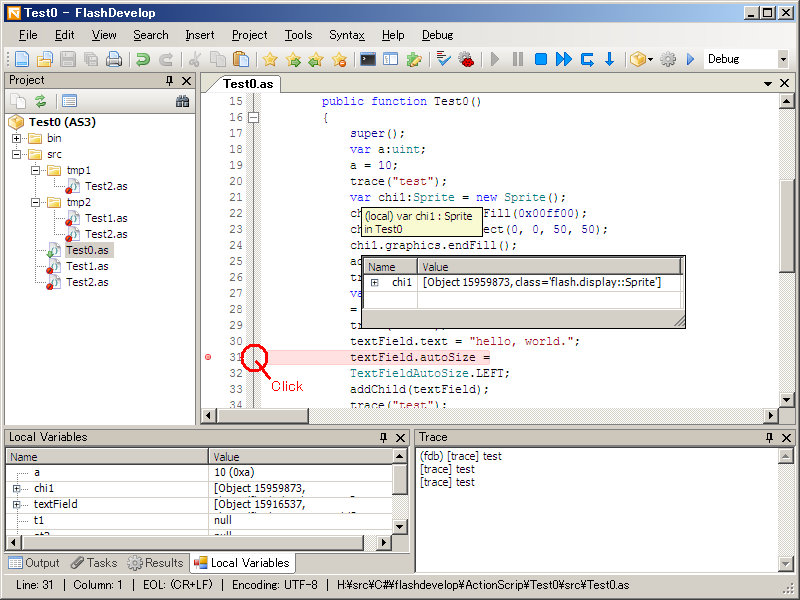
- To start a debug session press the new play button (if you check the gui, you will see a few new icons, play, pause, stop, fastforward etc)
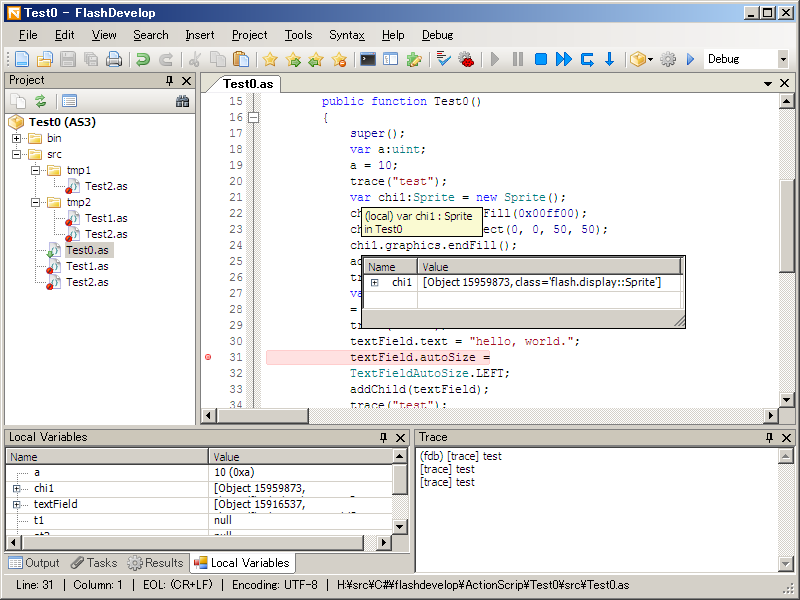
- When the program hits a breakpoint you can hoover on the variable to view its contents/value. (Just like in visual studio)
8 responses
very very useful, great thanks
I set up the develop enviroment step by step according to your instructions. However, there is an error occurs when i try to run the as file, here are the details of the error Object reference not set to an instance of an object. at FdbPlugin.PluginMain.CheckCurrent() at FdbPlugin.PluginMain.Start_Click(Object sender, EventArgs e) Thanks
I get the same error as dewen. please help, using Flash develop 3.0 and flex_sdk_3.3.0.4852
The error is probably related to the Fdbplugin. It seems like the author of the Fdbplugin creates builds that only work with a specific version of flash develop. (Using it on an older or newer version than the one intended wont work).
While trying with FD 3.0 RC2, I can set the DebugFlashPlayerPath but after restarting I can’t see the new debugger icons and moreover, I get this error: Type ‘FdbPlugin.PluginMain’ in Assembly ‘FdbPlugin, Version=0.4.6.1, Culture=neutral, PublicKeyToken=null’ is not marked as serializable. at System.Runtime.Serialization.FormatterServices.InternalGetSerializableMembers(RuntimeType type) at System.Runtime.Serialization.FormatterServices.GetSerializableMembers(Type type, StreamingContext context) at System.Runtime.Serialization.Formatters.Binary.WriteObjectInfo.InitMemberInfo() at System.Runtime.Serialization.Formatters.Binary.WriteObjectInfo.InitSerialize(Object obj, ISurrogateSelector surrogateSelector, StreamingContext context, SerObjectInfoInit serObjectInfoInit, IFormatterConverter converter, ObjectWriter objectWriter) at System.Runtime.Serialization.Formatters.Binary.WriteObjectInfo.Serialize(Object obj, ISurrogateSelector surrogateSelector, StreamingContext context, SerObjectInfoInit serObjectInfoInit, IFormatterConverter converter, ObjectWriter objectWriter) at System.Runtime.Serialization.Formatters.Binary.ObjectWriter.Write(WriteObjectInfo objectInfo, NameInfo memberNameInfo, NameInfo typeNameInfo) at System.Runtime.Serialization.Formatters.Binary.ObjectWriter.Serialize(Object graph, Header[] inHeaders, __BinaryWriter serWriter, Boolean fCheck) at System.Runtime.Serialization.Formatters.Binary.BinaryFormatter.Serialize(Stream serializationStream, Object graph, Header[] headers, Boolean fCheck) at PluginCore.Utilities.ObjectSerializer.Serialize(String file, Object obj) Pity, cause debugging is certainly very, very usefull. Ronald
Sorry, I forgot to mention this is fdbPlugin0.4.6.1
fdbPlugin0.4.6.1 is not working with FlashDevelop 3.0.0 RC2. When I use “Start” from the “Debug” menu: Object reference not set to an instance of an object. at AS3Context.PluginMain.HandleEvent(Object sender, NotifyEvent e, HandlingPriority priority) at PluginCore.Managers.EventManager.DispatchEvent(Object sender, NotifyEvent e)
error does not happen when you debug a project, not a stand alone .as file. this works for both fdbplugin0.4.6.1 and 4.5.0