
Here is a small tip for improving the performance on your Macbook Pro if it has the Nvidia MCP79 controller.
By default Windows 7 will pick the IDE driver instead of the SATA driver. While your drives will perform just fine, the performance might be a bit lower compared to what you get under Mac OS X.
Since I’ve upgraded my 13″ MacBook Pro (MBP5,5 – 2009) HDD to an Intel SSD (x-25M G2) last year, I noticed that I wasn’t getting the performance comparable to the benchmarks that can be found online.
Here are a few steps that I found on insanelymac.com (credits to Zr40) that will solve this issue. Please note that this will only work for Macbook Pros with the Nvidia MCP79 chipset (some forum users report BSOD when trying this hack on other chipsets):
- In Device Manager, find the Standard Dual Channel PCI IDE Controller.
- Choose ‘Update Driver Software’, ‘browse…’, ‘let me pick…’.
- Uncheck ‘Show compatible hardware’.
- Choose ‘Standard AHCI 1.0 Serial ATA Controller’ in the manufacturer list, and the same for model (should be the only model)
My Intel X-25M 80 GB G2 (FW: 2CV102M3) in IDE mode (using Standard Dual Channel PCI IDE Controller):
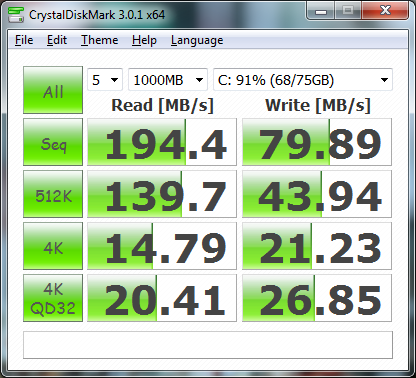
My Intel X-25M 80 GB G2 in AHCI mode (using Standard AHCI 1.0 Serial ATA Controller):

3 responses
Thanks so much for this simple, elegant solution !! ….. after spending 1+ hours on various Mac support fora …. and, for taking the time to document it w/ CDMark performance graphs! also, after enabling this, I verified trim is enabled w/ CMD prompt: fsutil behavior query disabledeletenotify Results explained below: DisableDeleteNotify = 1 (Windows TRIM commands are disabled) DisableDeleteNotify = 0 (Windows TRIM commands are enabled)
I know this post is old and does work! But it disables sd card and cd drive in windows 7! Is there any work around to this yet?
I’m not aware of this issue, seems to work fine here. Make sure to use the latest bootcamp.